
Deadlock Minor Update Adds New Item Icons, But Some Players Are Crashing When Opening Steam Profiles
A new minor update for Deadlock has gone live, bringing a few small but noticeable interface changes to the game. While this is not a major gameplay patch, the update has already caught the attention of players thanks to new item icons and a useful Steam profile shortcut.
However, shortly after the update, many players also started reporting a new crash issue related to opening player profiles. The error appears to be connected to the ViewSteamProfile UI element and, in many cases, outdated mods.
Below, we’ll cover what changed in the latest Deadlock update, why some players are crashing, and how to fix the issue.
What Changed in the Latest Deadlock Update?
The latest Deadlock minor update appears to focus mainly on UI and visual improvements.
Two item icons have been updated:
- Boundless Spirit
- Diviner’s Kevlar
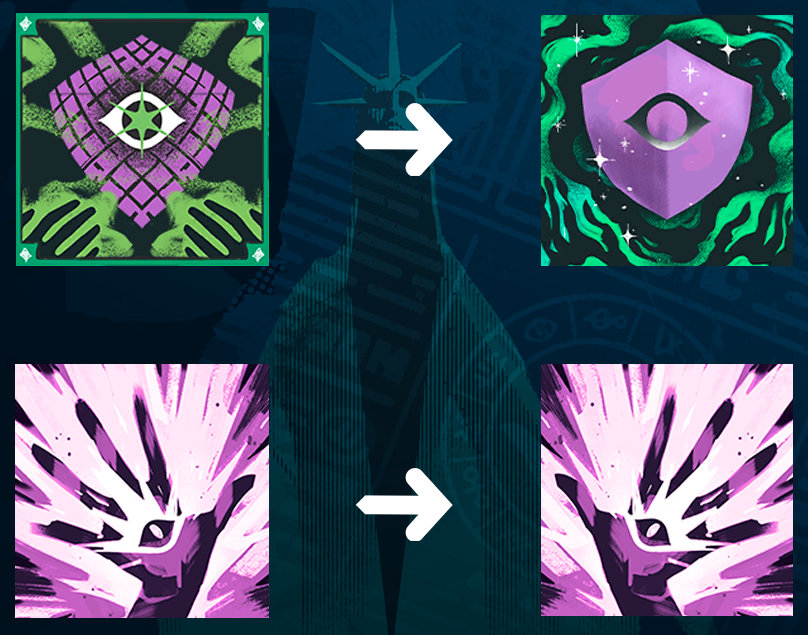
These changes are mostly cosmetic, but they make the items easier to recognize in the shop and inventory interface.
The update also added a Steam icon next to the Friend ID. When clicked, this button should open the selected player’s Steam profile. This is a useful quality-of-life feature, especially for players who want to check profiles, add teammates, or quickly identify other users after a match.
Deadlock ViewSteamProfile Crash Error
After the update, some Deadlock players began experiencing crashes when clicking their profile picture, opening a Steam profile, or interacting with the new profile button.
The most common error message is:
FATAL ERROR: Unable to find child 'ViewSteamProfile' in layout file 'panorama\layout\citadel_db_page_profile.xml'

In some cases, the game may crash instantly without showing the full error message.
Players have reported that verifying game files through Steam does not always solve the issue. This suggests that the problem is not necessarily caused by corrupted game files.
What Causes the ViewSteamProfile Error in Deadlock?
Based on player reports, the crash is most likely related to an outdated version of the QOL Lock mod.
The latest Deadlock update changed or added interface elements connected to Steam profile viewing. If a UI-related mod is still using an older version of the game’s layout files, it can conflict with the new interface and cause the game to crash.
This is why the error mentions:
- ViewSteamProfile
- The game is trying to access a UI element that the outdated mod version does not properly support.
- How to Fix the Deadlock Crash After the Update
- The current most reliable fix is to update QOL Lock through Deadlock Mod Manager.
Follow these steps:
- Open Deadlock Mod Manager.
- Find the QOL Lock mod.
- Update it to the latest available version.
- Restart Deadlock.
- Try opening your profile or clicking the Steam profile button again.
For many players, updating QOL Lock fixes the crash immediately.
What If Updating QOL Lock Does Not Work?
If the crash continues after updating the mod, try these additional steps:
- Remove QOL Lock completely through Deadlock Mod Manager.
- Restart the mod manager.
- Reinstall the latest version of QOL Lock.
- Launch Deadlock again.
If that still does not help, temporarily disable all UI-related mods and test the game without them. Mods that change the Panorama interface may break after Deadlock updates, even if the patch itself is small.
What If You Do Not Use QOL Lock?
If you are not using QOL Lock but still get the ViewSteamProfile crash, try the following:
- Verify Deadlock game files through Steam.
- Disable all installed Deadlock mods.
- Remove outdated UI or profile-related mods.
- Restart Steam.
- Reinstall your mods one by one to find the cause.
Since this issue appears to be linked to UI layout changes, any mod that modifies the profile page, player cards, or interface elements could potentially cause the crash.
Should You Remove Deadlock Mods After Every Update?
You do not always need to remove your mods after every Deadlock update, but you should always check for mod updates.
Deadlock is still receiving frequent changes, and even minor patches can affect UI files. If you use mods like QOL Lock, Deadlock Mod Manager, or other interface improvements, make sure they are updated whenever a new game patch arrives.
This is especially important if you see errors related to:
- panorama
- layout
- citadel_db_page_profile.xml
- ViewSteamProfile
These errors usually point to a conflict between the game’s current UI files and an outdated mod.